
Welcome to the final post in our series on eBPF for debugging. We’ve covered the basics of bpftrace and the command-line tools from the BPF Compiler Collection (BCC). Now, we’ll take a leap forward and learn how to write our own custom eBPF tools using Python and the BCC framework.
Writing Custom Tools with BCC and Python
While the pre-built BCC tools are powerful, the true potential of eBPF is unlocked when you start writing your own tools to solve specific problems. The BCC framework provides Python bindings that allow you to write eBPF programs in C and interact with them from a Python script.
Let’s write a simple tool that traces open() system calls, similar to opensnoop, but with our own custom output.
Create a file named myopensnoop.py with the following content:
#!/usr/bin/python3
from bcc import BPF

# eBPF program written in C
bpf_program = """
#include <uapi/linux/ptrace.h>
#include <linux/fs.h>

BPF_HASH(start, u32);

int trace_open_entry(struct pt_regs *ctx, int dfd, const char __user *filename)
{
    u32 pid = bpf_get_current_pid_tgid();
    bpf_probe_read_user_str(&start, sizeof(start), (void *)filename);
    return 0;
}
"""

# Load the eBPF program
b = BPF(text=bpf_program)

# Attach the eBPF program to the openat() syscall
b.attach_kprobe(event="do_sys_openat2", fn_name="trace_open_entry")

# Print the header
print("%-18s %-16s %-6s %s" % ("TIME(s)", "COMM", "PID", "FILE"))

# Process events
while True:
    try:
        (task, pid, cpu, flags, ts, msg) = b.trace_fields()
        print("%-18.9f %-16s %-6d %s" % (ts, task.decode('utf-8', 'replace'), pid, msg.decode('utf-8', 'replace')))
    except KeyboardInterrupt:
        exit()
To run this script, make it executable and run it with sudo:
chmod +x myopensnoop.py
sudo ./myopensnoop.py
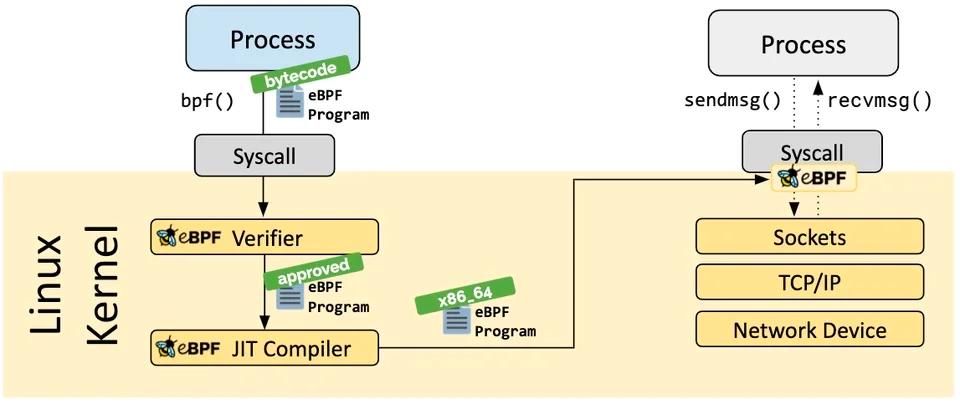
This is a simplified example, but it demonstrates the basic structure of a BCC Python tool. You write your eBPF C code inside a Python string, load it with BPF(text=...), attach it to a kernel probe, and then process the events in a loop.
Advanced Use Cases: Security and Beyond
eBPF is not just for debugging and performance analysis. Its ability to inspect and control system behavior at the kernel level makes it a powerful tool for security.
For example, eBPF can be used to:
- Detect and block malicious activity: By monitoring system calls, you can detect suspicious behavior like unexpected file access, network connections, or process executions. The
windshock.github.ioarticle shows how to detect eBPF-based backdoors. - Enforce security policies: Tools like Cilium use eBPF to enforce network security policies at the kernel level, providing fine-grained control over network traffic between containers and microservices.
- Gain deep visibility for forensics: eBPF can provide a wealth of information for digital forensics and incident response, allowing you to reconstruct the timeline of an attack with a high level of detail.
Conclusion
This series has been a journey from the basics of bpftrace to writing custom eBPF tools with Python. We hope you’ve seen how powerful and versatile eBPF can be for debugging, performance analysis, and security on Linux.
The eBPF ecosystem is constantly growing and evolving, so we encourage you to continue exploring and learning. The official eBPF website at ebpf.io is a great resource for staying up-to-date with the latest developments.


Comments